Loading…

New in 1.1 · Command Center · grounded answers
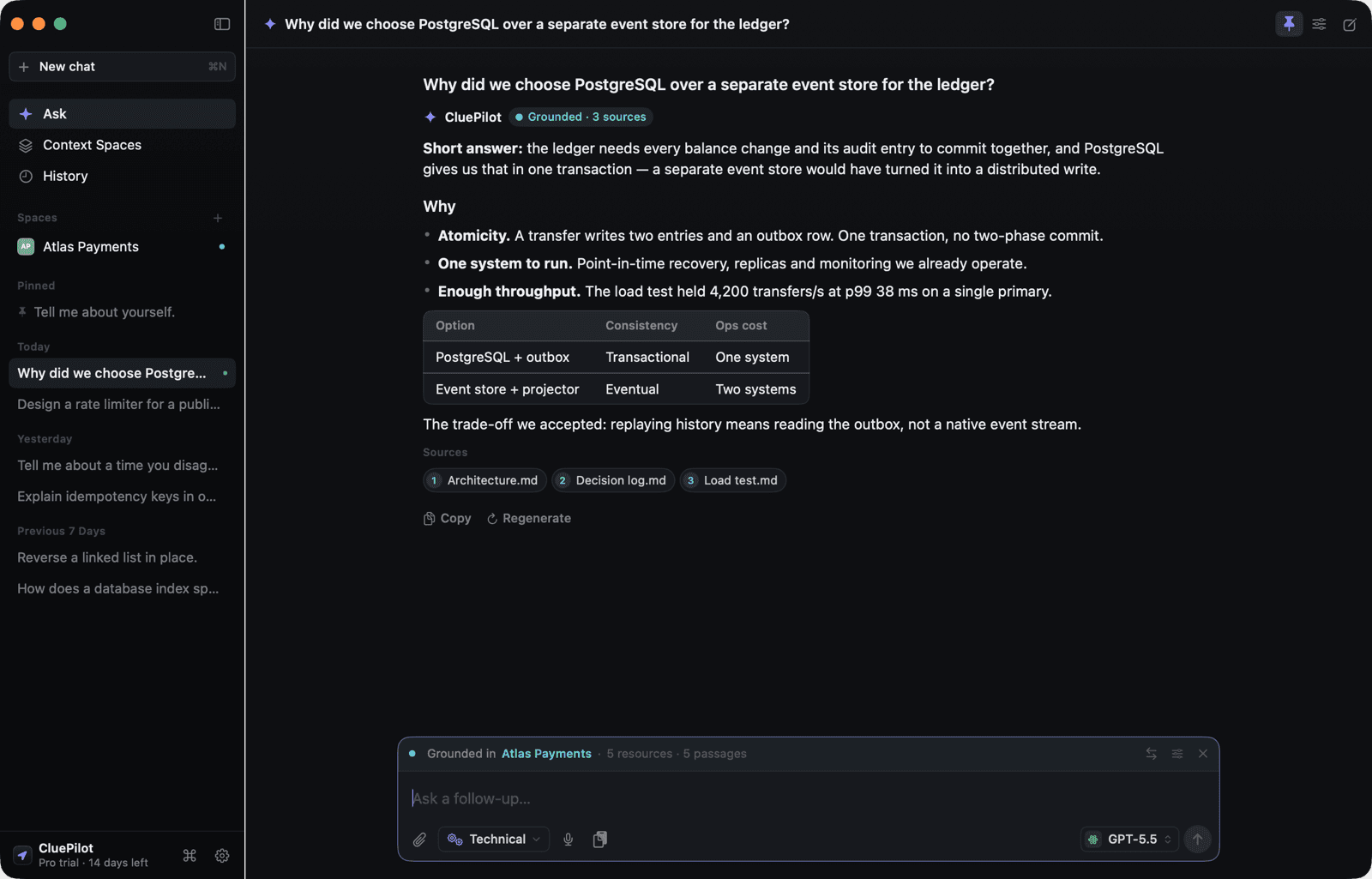
Think clearly. Respond faster.
One shortcut from any app and the answer is already streaming — structured, spoken-ready, and grounded in your own documents when you want it. A native Mac copilot on your own AI key. Private by design.
macOS 14 Sonoma or later · Apple silicon & Intel · free to use, no account
Take the tour
A copilot built for the Mac
A Command Center for the moment, a workspace for the preparation, and answers you can trace back to the page they came from.
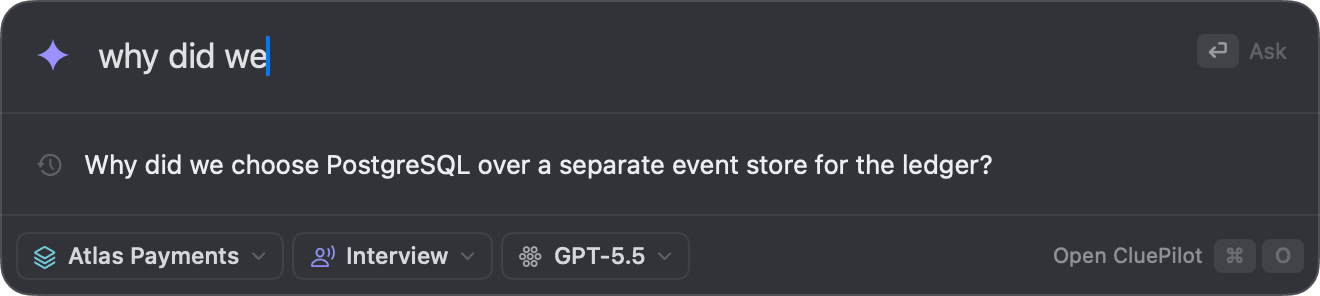
Ask from anywhere
⇧⌘Space opens a compact ask-anything bar over whatever you are doing. It autocompletes from questions you have asked before, suggests the project you mention, and streams the answer in place. ⌘O carries the conversation into the full window.
The problem
Why good candidates still fail interviews
It is rarely about what you know. It is about producing it, structured, in the next ten seconds.
You blank under pressure
You know this cold at your desk. On the call, with a stranger watching, it evaporates.
The clock is merciless
A great answer five minutes late scores like no answer at all. Interviews reward the one that arrives now.
You can't drill everything
Behavioural, coding, system design, trivia — nobody has time to rehearse every direction the hour can go.
Structure beats recall
Interviewers score clear, ordered answers. Rambling through the right facts still reads as a miss.
In the moment
The answer, right where you need it
CluePilot floats beside your work in its own window and streams a structured, say-it-out-loud answer — while whatever you share shows only itself.
Your Mac — everything you see
# Interviewer: “Reverse a linked list — talk me through it.”
1def reverse_list(head):
2 prev = None
3 while head:
4 head.next, prev, head = \
5 prev, head, head.next
6 return prev
CluePilot · Codingesc to hide
Approach: walk the list once, flipping each node's pointer as you go — three variables, no extra memory.
Say: “I'll iterate with two pointers, reversing links in place — O(n) time, O(1) space…”
Shared window — what they seeSharing
# Interviewer: “Reverse a linked list — talk me through it.”
1def reverse_list(head):
2 prev = None
3 while head:
4 head.next, prev, head = \
5 prev, head, head.next
6 return prev
Just you and your code
Every meeting app
Works the same everywhere
CluePilot never touches your meeting app. It is a Mac window that floats over whatever is on screen — so Zoom, Google Meet, Teams and the rest all behave identically, and none of them can break it with an update.
Zoom
Native app
Google Meet
Any browser
Microsoft Teams
Desktop & web
Amazon Chime
Native & web
Webex
Native app
Slack huddles
Native app
HackerRank
Any browser
CoderPad
Any browser
…and any other app on your Mac. There is nothing to install per platform, because there is no integration to install.
How it works
Four steps, no detours
One global shortcut, from anywhere. The answer starts arriving before you have finished reading the question.
1
⇧⌘Space
- from any app
- window opens in <1s
2
Ask
- type, paste or speak
- pick a response mode
3
Your provider
- your key, direct
- or fully on-device
- no server of ours
4
Answer streams
- copy with ⌘C
- esc to hide
Saved locally to your Mac · nothing is uploaded to us · there is no us
Why CluePilot
Not another chat tab in a wrapper
Four things a browser tab and a monthly token bill can't give you. Explore the core, then dig into each.
Tap a feature below
Fast & native
⇧⌘Space opens the Command Center from any app. Built in Swift — not a browser pretending to be an app.
The honest comparison
“Why not just use ChatGPT?”
Fair question. Here is where a dedicated Mac tool earns its place.
| A chat tab | CluePilot.ai | |
|---|---|---|
| Open it | Find the tab, click, wait | One global shortcut, <1s |
| Your data | On their servers, tied to an account | On your Mac, no account |
| Cost | ~$20/mo subscription | Your key at cost, or free tiers |
| Offline | No | Yes — Apple Intelligence & Ollama |
| During a call | Alt-tab away to a browser | Floats over Zoom, Meet, Teams — every Space |
| Interview-shaped | You prompt it every time | Six built-in modes |
| Your background | Re-paste each session | Saved once, used everywhere |
Questions
Asked before every download
How fast is it, really?
One global shortcut opens the window in under a second, and every provider streams — the first words of the answer usually land before you have finished reading the question.
Does it work with Zoom, Teams and Google Meet?
All of them, and identically — because CluePilot never touches the meeting app. It is a Mac window that floats over whatever is on screen, so Zoom, Google Meet, Microsoft Teams, Amazon Chime, Webex and anything else all behave exactly the same. Nothing to install per app, nothing to configure, and nothing that breaks the week one of them ships an update.
Can I use it during a live call?
CluePilot is a regular Mac window you can pin above any app, fade to glass, and dismiss with esc. Use it wherever AI assistance is allowed — practice sessions, take-homes, and interviews that permit it. What is allowed is between you and your interviewer.
Will the other side see it?
It lives in its own window on your Mac — nothing is injected into your browser or call software. If you share a single window or tab, only that window is shared. It has no feature to defeat proctoring or monitoring, by design.
Do I need an account or a card?
No. Download, open, ask. Basic is free for as long as you like — 2 interview sessions a month on your own AI key — and every install starts with a full 14-day Pro trial, no card and no sign-up.
Which AI does it use?
Your choice of eight providers — OpenAI, Anthropic, Google, xAI, Groq, OpenRouter, or fully on-device with Apple Intelligence and Ollama. Your key, their prices, no markup.
What happens to my questions?
They go directly from your Mac to the provider you chose — or nowhere at all in on-device mode. History is stored locally. We run no server and never see your data.
A tool for preparation. CluePilot is for practising, studying and permitted assistance — not for use in interviews, exams or assessments that forbid it. It has no feature to defeat proctoring or monitoring, by design. See responsible use.
Download
Interview smarter, starting today
A single drag-to-install disk image. No installer, no account, no sign-up.
Requires macOS 14 Sonoma or later · 7.3 MB